Installation
Starst3r Python
Starst3r can be installed as a pip package.
pip install starst3r
The package includes four Python modules:
starster: The main library.mast3r: The Mast3r codebase.dust3r: The Dust3r codebase.models: Croco v2 codebase.
For most cases, your script will only use the starster module.
See Quickstart for more information on how to use the library.
Download Mast3r model
Download the pretrained Mast3r model.
https://github.com/naver/mast3r/?tab=readme-ov-file#checkpoints
Starst3r uses the same Mast3r model internally.
Building
The Python module can be built and installed from source.
./build.sh python
pip install build/dist/*.whl
This will create the appropriate file structure and build the Python package in
build/dist.
Blender installation
Starst3r can be used as a Blender add-on.
Due to the nature of Blender Python, the installation procedure is complicated.
Please follow the instructions carefully.
1. Configure scripts
If you haven’t done so in the past, you must configure the Blender Python scripts directory.
This is an additional directory that Blender will load user installed Python modules from.
Create a new directory where you would like. Create an extra directory ``modules`` inside your chosen directory.
So, if you choose to use /home/user/BlenderScripts, you should create a directory
/home/user/BlenderScripts/modules.
In Blender’s preferences, add a script path and set it to your chosen directory, without the ``modules`` directory.
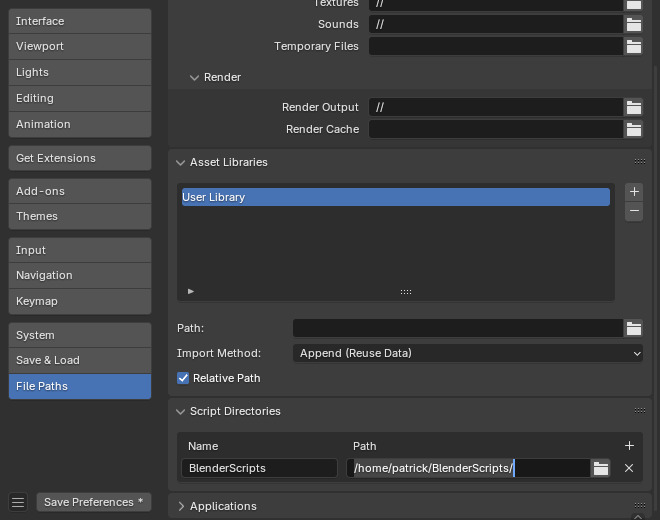
2. Install modules
Next, install Starst3r (and it’s dependencies) into the modules directory.
Use the --target option of pip to set the install dir.
pip install --target=/home/user/BlenderScripts/modules starst3r
3. Remove numpy
There is a known issue with user installed numpy.
Remove the numpy installation from modules.
rm -r /home/user/BlenderScripts/modules/numpy*
4. Install add-on
Install the add-on zip file as you would any other add-on.